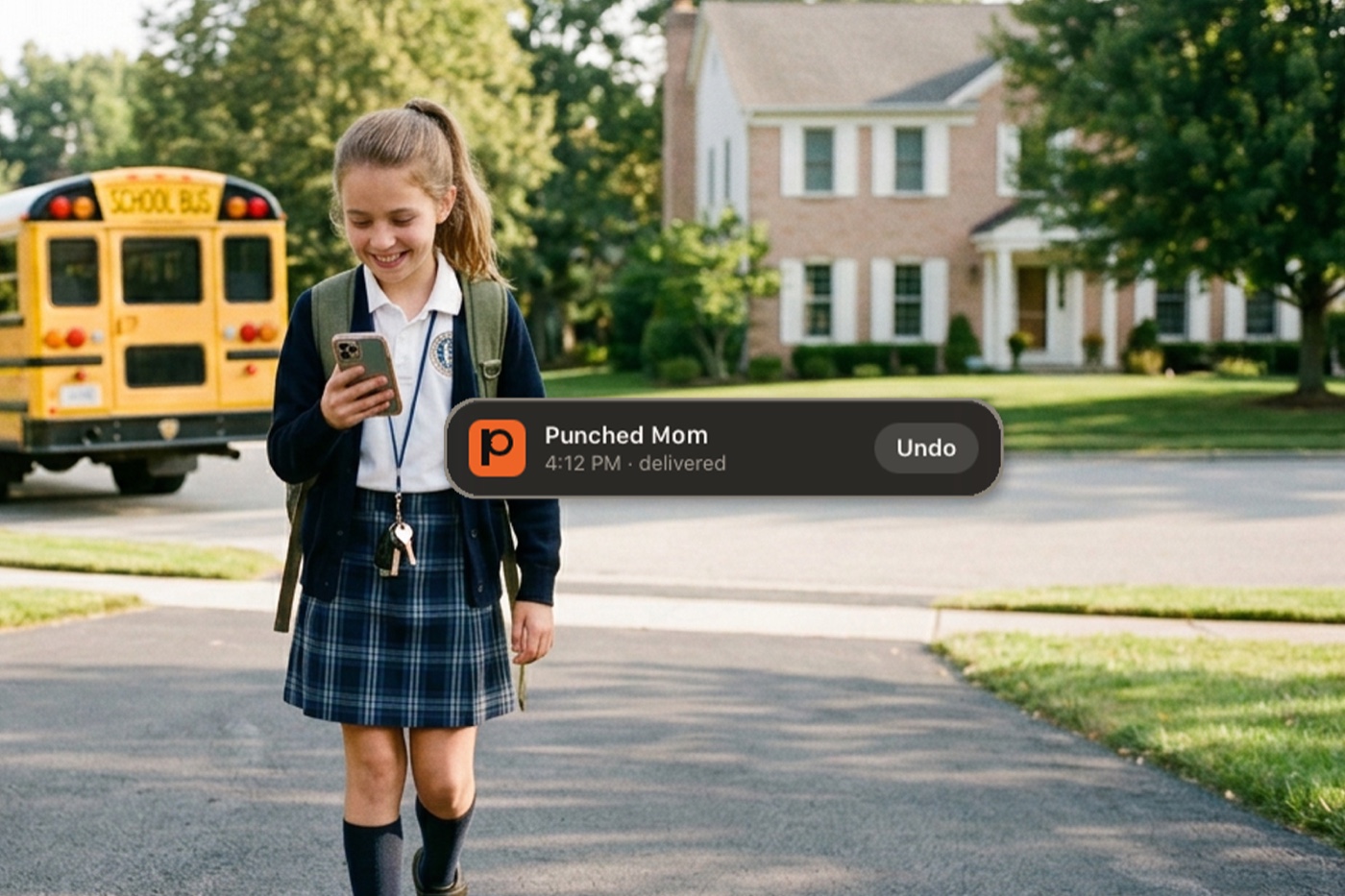
At 2:30 in the morning my phone made a punch sound like the "thwack" Batman gives a street thug. It woke me up.
I looked at the notification. My mother had punched me. I looked at the time on it. Then I put my robe on and walked down the hall, because I already knew what it meant.
Her dog was sick. She needed me to take the dog out…quickly. I'd punched her back the second I saw it, so she knew I was awake and coming. Neither of us typed anything. Neither of us opened a thread, found a name, watched three dots animate, or tried to type a sentence at 2:30 in the morning without our glasses.
At that point three people on earth could send and receive a punch: me, my brother, who is the co-developer and lives several states away, and my mother, 89, whom I take care of. That was the entire user base. That punch was all I needed to know I was needed.
What it is
Punchya works like a text message, except it sends a sound and a vibration. There's no text field. No thread. No typing indicator, spell-check, stickers, animated GIFs or emoji picker. You pick a person, you punch. They get it. Haptics make sure they feel it too.
The content isn't in the app. It's in the agreement the two of you already made. Punch me when you're out front. Punch me when you get to your gate. Punch me before your dog redecorates the carpet. Settle that up front and the message can just be a one-syllable beat.
Describing it, it sounds trivial. Text messaging asks for spelling, vocabulary, intent and structure when most of the time all you needed to do was signal. It's in practice that you start to notice how much time it saves — and start getting mildly irritated when someone burns four minutes of your time going back-and-forth on something a single punch could have handled. "This meeting could have been an email." "This email could have been a text." "This text could have been a punch." It is the next evolution of efficient communication.
What you can't do with it
Punchya is sparse by design; there's no list of missing features yet to be baked in.
You can't write anything. You can't send a photo. You can't convey sarcasm with a little semicolon wink at the end. There's no history: the interface shows you when the last transaction with a person happened — Mary punched you two hours ago — and puts your most recent punch at the top of the list. That's it. No threads, no feed, nothing to scroll back through.
And you can't use it alone. It takes two people and one agreement, which makes it the rare app that's useless the moment you install it and useful about a minute later.
Punchya is 100% signal, 0% noise.
The part that takes some getting used to
The thing I'm learning as Punchya reaches people who haven't been living with it is that some of them will need to change a habit to get the most out of it. Not everybody. But for a lot of people this won't click right out of the gate, so here's the secret that makes it click:
End conversations by preloading the next one.
It sounds strange. Think about the people who back into a parking space. Ask them why and they'll tell you it's easier to leave. What they're doing is spending a little time now to make the next thing easier. That's the habit.
You drop a friend at the airport and say goodbye. Twenty-five minutes later you're wondering whether they made it through security in time to catch their flight. Now you have to type the whole question out to get the answer.
Or, instead of goodbye, you say: "Punch me when you get to your gate so I know you made it." Done. The only thing left to happen is the confirmation. You can close that loop while driving home without taking your hands off the wheel.
And if they didn't make it — that's a text message or a phone call. "I missed the flight, can you come back and get me, or I'm staying at a hotel." You can't say that in a punch and you shouldn't try. Punchya isn't for that.
But "let me know when you're home from school," "let me know when the plane lands," "let me know when the meeting's over" — all of those can be preloaded in a conversation you're already having, in person or on the phone. Then when it happens, you get the economy of one signal. And on the other end, when the punch arrives: what did I last say to that person? Right. That's the answer.
Casual punches
That's active use. Casual use is different, and it's most of what actually happens.
It's the weekend and I haven't heard from my daughter in a while, so I punch her. That's all. If she punches back, great. If she doesn't, she still knows I was thinking about her, and sometimes that's all anybody needs.
A punch can mean "what's up," "you awake," "thinking of you." You fill in the blank. And if you're genuinely not sure what it meant, that's information too — maybe they want to know if you're free for a call. So call them. Or text back: "got your punch, what's going on?" That's a completely valid use of the product.
"Why don't you just send a text? It takes four seconds."
That's the first thing people say. My sister said it. It's a fair objection, so here's the answer: let me get a stopwatch out and time you.
I've spent the past few days building a demo that does exactly that. It lets me dial how many characters per second somebody can type and race it against a punch.
Do it yourself right now. Pull up your messaging app and the keyboard, type a sentence, any sentence, and count the characters you got out in one second — "one Mississippi" — with no spelling errors. Because if there's a spelling error you go back and fix it, and that costs more.
Four seconds is bogus. No one types a clean, complete sentence in four seconds. If you can, maybe you don't need Punchya, and I mean that sincerely — go be fast at texting, it's a useful skill. I'm not that fast with my thumbs, and I can now send a message in under a second.
Try it with "Dinner's ready." Count the characters. You can't just send "DR." You have to type the whole thing, and I'll send a punch that we both already agreed means dinner's ready, and we'll see who gets there first. I'll save you some mashed potatoes.
But speed isn't really the argument. Efficiency is. I don't need a full conversation with every person I communicate with every time. Sometimes the whole communication is one tap — dinner's ready, the dog needs to go out — and one optional tap back, the punch-back, which means got it, coming down or okay, let me get my shoes on. All the typing you'd do in your four seconds, both of you, compressed into two taps.
And the cost of a text isn't the four seconds anyway. It's composition. A text makes you produce a sentence at 2:30 in the morning, or in line at the coffee shop, or standing in the rain with an armful of groceries. Then it makes the other person read it, weigh it, and answer it, because an unanswered text is a small open loop. Two people doing work neither of them needed to do.
Judge for yourself.
One conversation, two methods, head-to-head. Send & receive. We'll even give texting a head start.
"You've abbreviated an abbreviation"
The other reaction I get is: my god, how lazy can you be.
Don't confuse "lazy" with "efficient." Let's break it down. Before telephones you had to get in front of a person and talk to them. Then we had phone calls. Then text messaging — and even in the T9 days on Nokia candy bar phones, people were abbreviating. Half of it looked like a Prince album, all 2s for to and 4s for for. People wanted to get the thing out faster than they could type it.
Then emoji. Somebody laughed, you sent the laughing face. Somebody said something gross, you sent the puke face. That's an abbreviation too, and it's a completely legitimate way to communicate.
Punchya is the next notch on that. It still carries payload in the right context. Sometimes it carries the entire conversation. It's just a question of how you use it.
And it isn't setting out to replace anything. Not text messaging, not emoji, not phone calls, not email, not a knock on the door. When people ask "why wouldn't I just send a text" — go ahead. Send a text. No one is telling you to delete your messaging app and communicate exclusively in punches. That would be ludicrous.
What I'm offering is another option that, in the right moment, saves you a lot of typing.
Why it's called a punch
People already say "ping me when you're ready." That's a radar ping — the submarine kind. You send out one bleep, it hits something, it comes back. That's the whole transaction, and the word survived into everyday conversation because the shape of it is useful: I'll ping you about lunch.
Facebook tried this with the poke. It never took, and I think there were two reasons. One, they never explained what it was for. People got poked and had no idea what they were meant to do about it. Two — and I have no proof of this, it's a hunch — "poke" sounded vaguely sexual and a little weird. Bob poked you. Um…okay? Should I report him to HR?
Nobody ever said "poke me when you get out of the meeting." But "punch me when you get out of the meeting" sounds like something a person would actually say. "Punch me when you get to your gate." "Punch me when you get home from school." That works.
The lesson I took from the poke isn't the name, though. It's that they shipped a new primitive and never taught anyone how to use it.
Which is why there's an onboarding
I've been holding the public beta back for one reason: I wanted to be sure somebody could arrive cold and understand what they'd just installed.
Here's the path. You invite someone from your contacts. They get a normal text message with a postcard — logo, a line about what this is — and a link to a page that explains Punchya and walks them through installing it. That's their first explanation, and it comes with a friend's name attached to it. They're not installing it because I told them to. They're installing it because somebody they know said "get this so we can punch each other."
Then they open the app, and instead of being dropped onto an empty list of names and told to go nuts, they get three screens. What the app is for. Why you'd want to share your contacts — it makes setup much faster and it finds the people you already know who are on it. And push notification permission, which is the one that matters: without it you can send punches but you can't receive them, which defeats the entire thing.
Plenty of people skip onboarding in every app they install, so a QuickStart Guide is also getting tucked into the About section alongside FAQs and a few power tricks, so you'll be able to go back and find it when you decide you want to get more out of this.
You mostly don't have to pick up your phone
The obvious way to send a punch is to open a person's card and hit the big red button. It's not the only way, and it might not even be the way you use most.
From the list of people, swipe right. One gesture, punch sent.
If a punch comes in on your locked phone, press and hold the notification and a menu comes up with "punch back" on it. You've acknowledged the punch without unlocking your phone or opening the app. Set the phone down and get on with your day.
If you wear an Apple Watch, let the notifications go there first. You're under the table in a meeting, your wrist buzzes, you glance down, you see who it was, you tap once. Punch-back. Done. Meanwhile, you just found out that lunch has arrived.
Which is a much better look than the alternative. Have you ever been caught texting under the table in a meeting? Tapity tap tap tap. I have, and I've been called out for it. A glance at your wrist and one tap on a big button says "I'm almost out of here" without you typing a word of it.
Coming soon: Siri voice activation and CarPlay, so you can hit the button on your steering wheel and send a punch. Lock screen widgets. The simplicity that comes from no keyboard actually opens up more options.
The thing I didn't design for
My daughter works the front desk at an urgent care. When she takes a break somebody covers for her, and if they need her back — punch. Her coworkers are on it now.
Then the doctor came by and said: let me know when my next appointment shows up, I'll be in my office, just punch me.
A doctor. "Punch me when my next appointment arrives." It's better than an intercom — no speaker blaring the patient's business across a waiting room, no front desk typing a text one-handed while checking someone in. One tap, he comes out.
I didn't build it for that. I built it for a dog at 2:30 in the morning. What I'm finding is that people arrive with a problem of their own and agree that one signal solves it, and then they build their own little vocabulary around it. In this house, a punch means the dog needs to go out. Anything else — the TV won't work — comes in as a text, because that's not something a punch can carry. In an urgent care, it means come up front.
That's the part I can't predict, and it's the actual reason the beta is open. I have a hypothesis about what this is for and a sample size of my family, which is not a sample size.
A side effect I didn't expect
There's a version of this that's a legal and engineering story, and it's a short one.
Build a messaging app and you're storing personally identifiable messages on a server. That is a liability, a compliance surface, and a target.
Take the payload out and most of that goes with it. The privacy policy got about 75% shorter. The risk to the company dropped. And the value of breaking into the server dropped too, because there's nothing in there worth stealing. It's encrypted, but even if you hacked through that, what you'd be reading is a list of device IDs and timestamps. There is no way to tell the difference between "dinner's ready" and "I've identified the mole in the department."
What "public beta" means, and what would actually help
It means it's out of the hands of the three people who've had it and open to anybody.
It's on TestFlight, which is Apple's "dress rehearsal" for the App Store. You install TestFlight — it's free — and it lets you run pre-release software from me and from other developers. Punchya isn't in the App Store yet. This is how you get it before it is.
The unwritten deal is: I give you early access, and if something is broken, or a button is cut off on your screen, or it does something you didn't expect, you tell me about it. Also welcome: "I tried this, wouldn't it be neat if it did that." Now is the time, while the concrete is still wet. I'll keep updating after launch, but a feature that makes sense right now has a much better chance of getting in right now.
Installing it by yourself will tell you nothing. What would actually help:
Install it. Get one person you talk to regularly to install it too. Agree on what a punch between the two of you means. Use it for two weeks. Then tell me what you used it for — not what you think of the app. What you used it for.
I'm watching whether people come back to it after the novelty wears off, and whether punches get returned. Those two numbers decide whether this is a product or a party trick. I'll publish them either way.
One note on where it came from
The About screen credits a 2014 LiveMike concept, because that's where the idea started. It sat for twelve years. What changed isn't the idea — it's that a version of it can now get built and shipped by one person directing the right tools and the right specialists, without a company, a funding round, or anyone's permission.
Twelve years is a long time to be early. I'd rather be late and shipping.
More on how the work actually gets done — tooling, process, the arguments behind the decisions — over at pjk.net.